Docker CLI and API version (in)compatibility with Podman Engine

Ok, this should be a quick one, but it got me at least twice so far, so it’s time to note it down.
Recently I updated both Podman Desktop (1.24.2) as well as Podman machine (after being 16+ months old).
However, there was no updates to the Podman engine (currently at 5.7.1).

I am using Docker CLI on macOS for all interaction with local images and containers, as Podman ensures API forwarding listening on /var/run/docker.sock.
Docker API clients (such is Docker CLI) default to this address. In most instances, you don’t need to set DOCKER_HOST.

Needless to say, just yesterday I also updated Docker CLI (29.1.5).

Until all of these updates, any Docker CLI command (such as docker images or docker image ls) was working without issues.
However, after the updates, I started getting this error:

1
2
3
❯ docker images

API version 1.41 is not supported by this client: the minimum supported API version is 1.44

I was able to find a hint about solution, although in different context, thanks to this SO question. Solution suggests that by placing {"min-api-version": "1.44"} inside ~/.config/docker/daemon.json or ~/.docker/daemon.json should make this issue go away. However, I had doubts that in my scenario that would help, because I am not using Docker engine (no Docker Desktop) and I don’t think that daemon.json configs are acknowledged by Podman.

Before going further into solutions, I really wanted to understand what is going on.
Quick look at output of docker version and things started to make sense.

1
2
3
4
5
6
7
8
9
10
11
12
13
14
15
16
17
18
19
20
21
22
23
24
25
26
27
28
29
30
31
32
33
34
35
36
37
38
39
40
41
❯ docker version

Client: Docker Engine - Community
Version: 29.1.5 <----- Version of Docker CLI (also confirmed via 'brew info docker')
API version: 1.52 <----- API version that Docker CLI is configured for
Go version: go1.25.6
Git commit: 0e6fee6c52
Built: Tue Dec 16 15:33:03 2025
OS/Arch: darwin/arm64
Context: default

Server: linux/arm64/fedora-43
Podman Engine:
Version: 5.7.1
APIVersion: 5.7.1
Arch: arm64
BuildTime: 2025-12-08T16:00:00-08:00
Experimental: false
GitCommit: f845d14e941889ba4c071f35233d09b29d363c75
GoVersion: go1.25.4 X:nodwarf5
KernelVersion: 6.17.7-300.fc43.aarch64
MinAPIVersion: 4.0.0
Os: linux
Conmon:
Version: conmon version 2.1.13, commit:
Package: conmon-2.1.13-2.fc43.aarch64
OCI Runtime (crun):
Version: crun version 1.24
commit: 54693209039e5e04cbe3c8b1cd5fe2301219f0a1
rundir: /run/user/501/crun
spec: 1.0.0
+SYSTEMD +SELINUX +APPARMOR +CAP +SECCOMP +EBPF +CRIU +LIBKRUN +WASM:wasmedge +YAJL
Package: crun-1.24-1.fc43.aarch64
Engine:
Version: 5.7.1 <----- Version of Podman engine (also confirmed via 'brew info podman')
API version: 1.41 (minimum version 1.24) <----- Version of Docker Engine API that Podman engine is working with
Go version:
Git commit:
Built:
OS/Arch: linux/arm64
Experimental:

So what are we dealing with here?

  • Docker CLI v29.1.5 (released on Jan 16, 2026) is configured with current maximum Docker Engine API version, which is 1.52

  • When this was released, they bumped the minimal supported Docker Engine API version to 1.44 (see this for additional evidence).

  • Podman Engine v5.7.1 (released on Dec 8th, 2025) is still configured for compatibility with Docker Engine API version 1.41, but it will work with min Docker Engine API version 1.24. I was also able to confirm this in Podman’s podman/version/version.go. Alternative way to confirm this is with the command below:

    1
    2
    3
    4
    5
    6
    7
    8
    9
    10
    11
    12
    13
    14
    15
    16
    17
    18
    19
    20
    21
    22
    23
    24
    25
    26
    27
    28
    29
    30
    31
    32
    33
    34
    35
    36
    37
    38
    39
    40
    41
    42
    43
    44
    45
    46
    ❯ curl --silent -XGET --unix-socket /var/run/docker.sock http://localhost/version | jq .
    {
    "Platform": {
    "Name": "linux/arm64/fedora-43"
    },
    "Components": [
    {
    "Name": "Podman Engine",
    "Version": "5.7.1",
    "Details": {
    "APIVersion": "5.7.1",
    "Arch": "arm64",
    "BuildTime": "2025-12-08T16:00:00-08:00", <---- Build time
    "Experimental": "false",
    "GitCommit": "f845d14e941889ba4c071f35233d09b29d363c75",
    "GoVersion": "go1.25.4 X:nodwarf5",
    "KernelVersion": "6.17.7-300.fc43.aarch64",
    "MinAPIVersion": "4.0.0",
    "Os": "linux"
    }
    },
    {
    "Name": "Conmon",
    "Version": "conmon version 2.1.13, commit: ",
    "Details": {
    "Package": "conmon-2.1.13-2.fc43.aarch64"
    }
    },
    {
    "Name": "OCI Runtime (crun)",
    "Version": "crun version 1.24\ncommit: 54693209039e5e04cbe3c8b1cd5fe2301219f0a1\nrundir: /run/user/501/crun\nspec: 1.0.0\n+SYSTEMD +SELINUX +APPARMOR +CAP +SECCOMP +EBPF +CRIU +LIBKRUN +WASM:wasmedge +YAJL",
    "Details": {
    "Package": "crun-1.24-1.fc43.aarch64"
    }
    }
    ],
    "Version": "5.7.1",
    "ApiVersion": "1.41", <----- THIS LINE
    "MinAPIVersion": "1.24", <----- AND THIS LINE
    "GitCommit": "f845d14e941889ba4c071f35233d09b29d363c75",
    "GoVersion": "go1.25.4 X:nodwarf5",
    "Os": "linux",
    "Arch": "arm64",
    "KernelVersion": "6.17.7-300.fc43.aarch64",
    "BuildTime": "2025-12-08T16:00:00-08:00"
    }

Basically, this new version of Docker CLI is capable of working with API versions [1.52, 1.44]. Podman Engine is expecting [1.41, 1.24].
And you can see that Podman team is already working on fixing this, in commit c9e2028.

For the solution, I simply configured my ~/.zshrc to set DOCKER_API_VERSION to 1.44.

1
2
cat ~/.zshrc | grep DOCKER
export DOCKER_API_VERSION=1.44

The DOCKER_API_VERSION environment variable is used to force the Docker client to use a specific version of the API when communicating with the Docker daemon (in my case Podman Engine). By default, the Docker client and SDKs use API version negotiation to automatically select a version supported by both the client and the Docker Engine. However, setting DOCKER_API_VERSION disables this negotiation and locks the client to the specified version.
Aside from possibility to be used for feature controls, the primary use of this env var is to resolve “client and server don’t have the same version” errors, which can occur if the client is newer than the daemon. If the client is newer than the daemon, the client can request API endpoints that the daemon doesn’t know about.

After this, everything started working again.

1
2
3
4
❯ docker images
i Info → U In Use
IMAGE ID DISK USAGE CONTENT SIZE EXTRA
quay.io/podman/hello:latest 83fc7ce1224f 580kB 0B U

Using Podman with GPU intensive containers

While troubleshooting issue with Docker CLI (macOS) API version compatibility with newer versions of Podman, I have learned that the default Podman machine (a.k.a Podman engine) that I am running is over 16 months old. While updating Podman machine (actually creating new Podman machine) didn’t make the original problem go away, I learned something new through this process, which I want to document here, because it seems not too many Podman users are aware of this (yet! and it’s 2026).

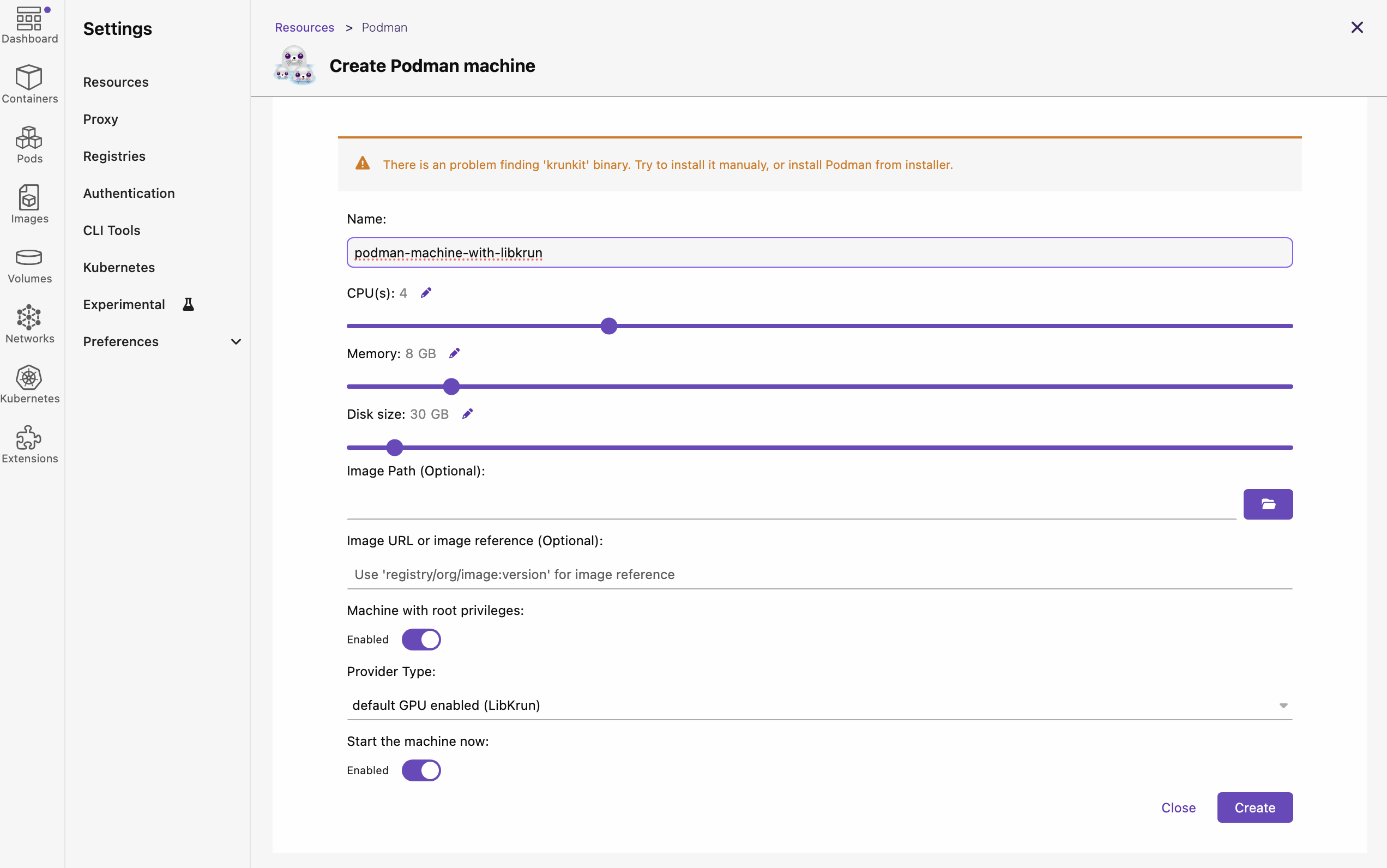
Ok, so first I deleted “default podman machine” and I was ready to create new one in Podman Desktop UI. Settings > Resources > Create new …

But then I noticed this warning:

There is an problem finding ‘krunkit’ binary. Try to install it manualy, or install Podman from installer.

Missing 'krunkit'

So quick googling about what this means and I learn that (starting versions 5.2.x of Podman) besides Apple Hypervisor (applehv), which relies on Virtualization.framework, they now allow to use alternative provider (meaning, virtualization provider) for macOS. That alternative provider relies on customizations on top of Hypervisor.framework, which is lower level API (than Virtualization.framework) from Apple.

“AppleHV” (short for Apple Hypervisor) refers to the native virtualization framework built into macOS, allowing software to run virtual machines (VMs) and containers directly on Apple hardware and it is default provider (for Podman engine virtualization) on all platforms other than Apple Sillicon. Some of the things it provides are:

  • Native Virtualization: It provides a low-level, native way to manage virtualization, often using Apple’s Virtualization.framework.
  • Podman Usage: AppleHV is commonly used as the backend provider for Podman Machine on macOS (especially with Podman v4.9.1+ and v5.x). It is often used in combination with tools like vfkit to create and run Linux virtual machines.
  • Performance (Rosetta): On Apple Silicon (M1/M2/M3 chips), AppleHV supports Rosetta 2, allowing for near-native speed when running x86_64 containers on ARM hardware.
  • Alternatives: It is the modern alternative to QEMU, which was previously the standard, often providing better performance.

While Apple Hypervisor is still great on Apple Sillicon Macs for “cookie cutter” containers that mostly just need CPU, those who want to leverage GPUs on their Mac (e.g. to run LLM models through Docker/Podman) might want to take advantage of this alternative provider.

The alternative provider relies on two important things (also prerequisites to be able to use this provider when creating new Podman machine):

  1. containers/libkrun - a dynamic library that allows programs to easily acquire the ability to run processes in a partially isolated environment using KVM Virtualization on Linux and HVF on macOS/ARM64.
  2. containers/krunkit - is a tool to launch configurable virtual machines using the libkrun platform.

The latter of the two is required in order to be able to run Podman machines with this new alternative provider.
The installation was very simple.

1
2
brew tap slp/krunkit
brew install krunkit

Restarting Podman Desktop and going to Settings > Resources > Create new… this time didn’t show the warning, which is signal that it properly detected libkrun and krunkit. However, first attempt to create Podman machine wiht “default GPU enabled (LibKrun)“ as a provider, didn’t work out as expected.
The machine got frozen in “Currently starting up“ stage forever. I had to force remove it, reboot and re-create podman machine.

1
2
3
4
5
6
# Delete stuck machine
podman machine rm --force podman-machine-gpu-enabled
# Reboot
# Create again via Podman Desktop
# Start
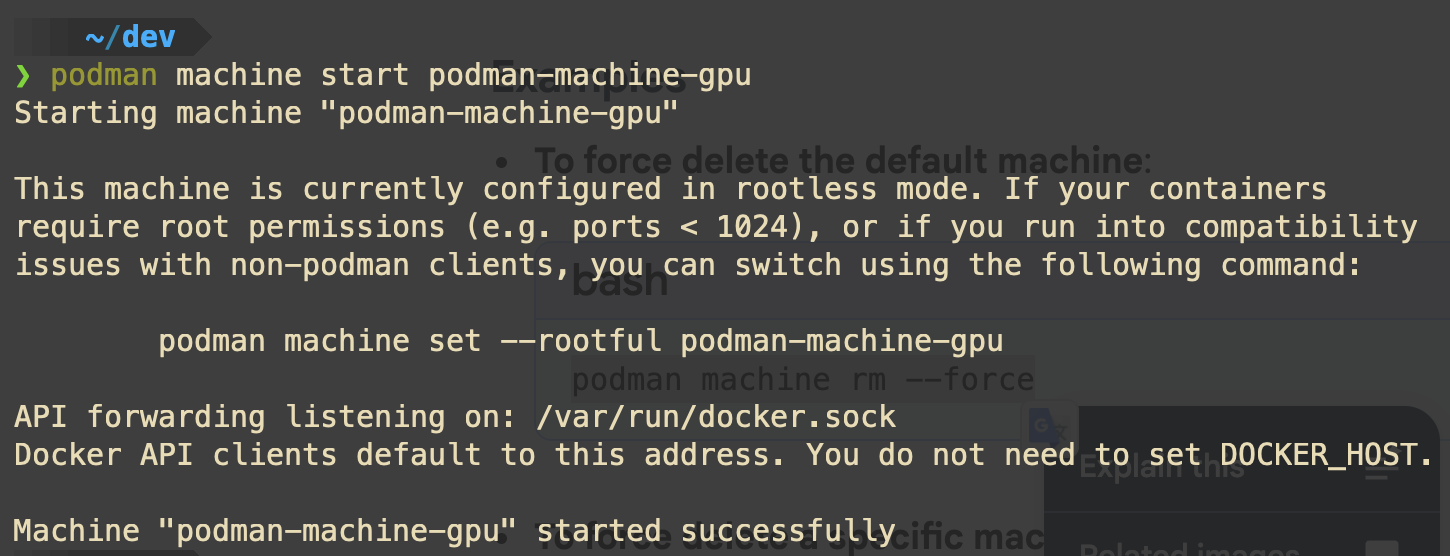
podman machine start podman-machine-gpu

New Podman machine running and using 'libkrun'

After this, I was able to see that machine is running and it is using libkrun for VM provider.

1
2
3
4
5
podman machine list

NAME VM TYPE CREATED LAST UP CPUS MEMORY DISK SIZE
podman-machine-gpu* libkrun About an hour ago Currently running 4 7.451GiB 27GiB

So now, I am ready to try out some LLM models loaded via Docker/Podman. This will be exciting, because up till now, I ran most local models via ollama and LM Studio.

Resources

  1. GPU Accelerated Containers on Apple Silicon with libkrun and podman machine - DevConf.US 2024
  2. How we improved AI inference on macOS Podman containers

Favorite PDF tools on macOS in 2026

It is almost the end of the 2025. I got unlucky with chalazion on both eyes after hitting a gym that I guess isn’t very well maintained and cleaned after all.
Ever since, I have been very sensitive with my eyes and trying not to put them through too much pressure. I also started noticing that no matter what kind of light settings I choose on the PocketBook reader app on the Android tablet, after a few hours of use, I start to feel the eye strain.

So to cope, I started searching for tools that would:

  1. Allow me to invert PDF books into black background with white text, while keeping images untouched (not inverted). This is in order to have better experience while reading on both tablet and Mac.
  2. Replace not so flexible reader layouts on macOS Preview (default app for PDFs on macOS) and allow me to use more screen when reading on large monitors (27” up to 34”)
  3. Ideally - they are FOSS

I was not very positive at first that such tools will exist in FOSS for macOS, but I was quite wrong.
After some digging and crawling through some blog posts, I decided to give these two a try:

  1. Skim - a PDF reader and note-taker for OS X (macOS)
  2. Stirling PDF - actively developed open-source web-based PDF editor that cares about privacy and security

About Skim

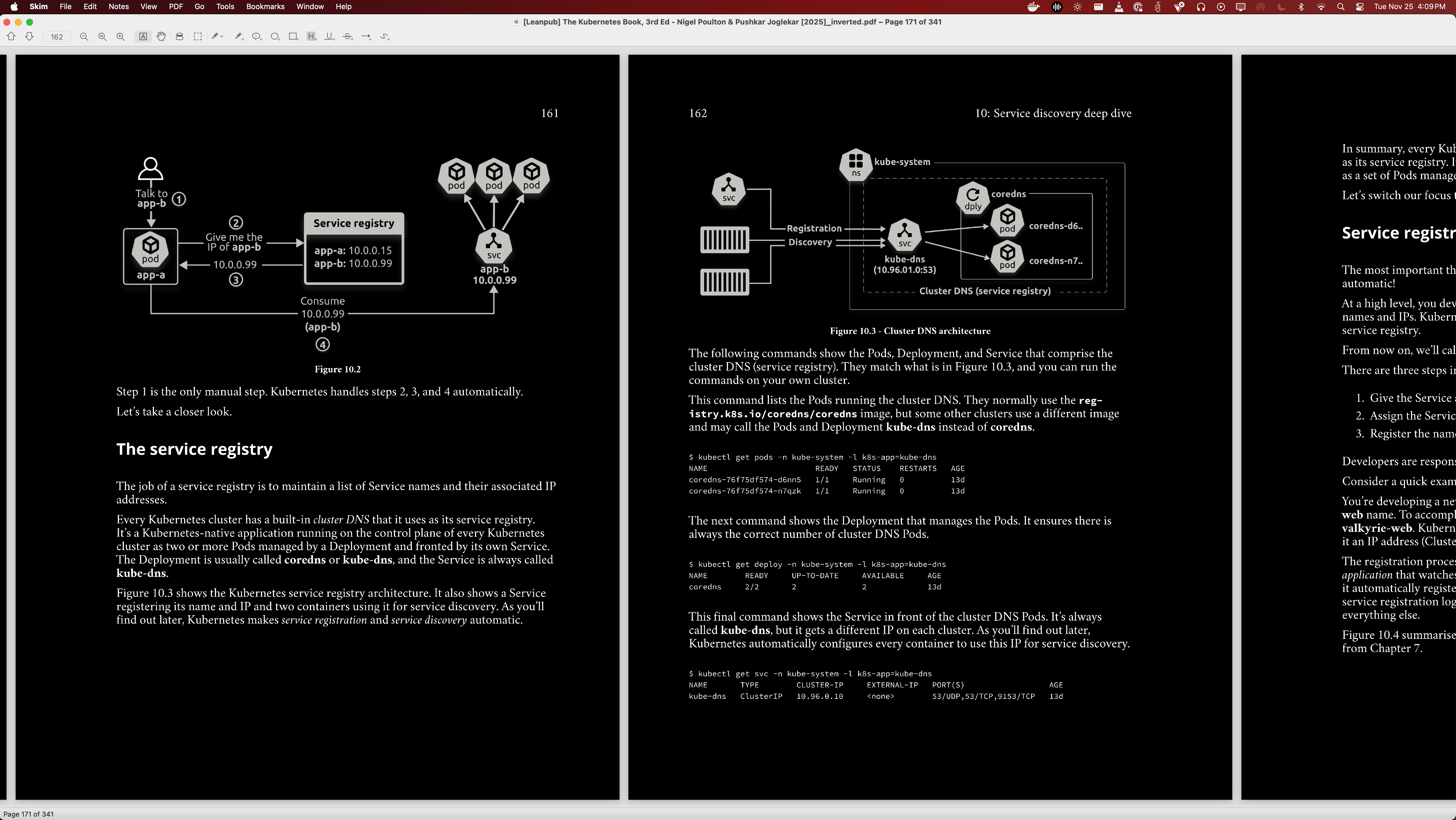
It is great! Very lightweight, installable through Homebrew and best of all, it has this “Horizontal Continuous” reader mode that I couldn’t be happier with. Depending on the book, it allows me to load up to 3 full pages of the book in the horizontal plane with enough zoom to not get eye strain on 27” monitor. The best part is the ease of scrolling horizontally which for me at least makes it harder to forget about the context when moving pages. For most books however, 2 pages loaded in this reading mode are the most comfortable setup. Image below shows an example.

Example of Skim running on macOS

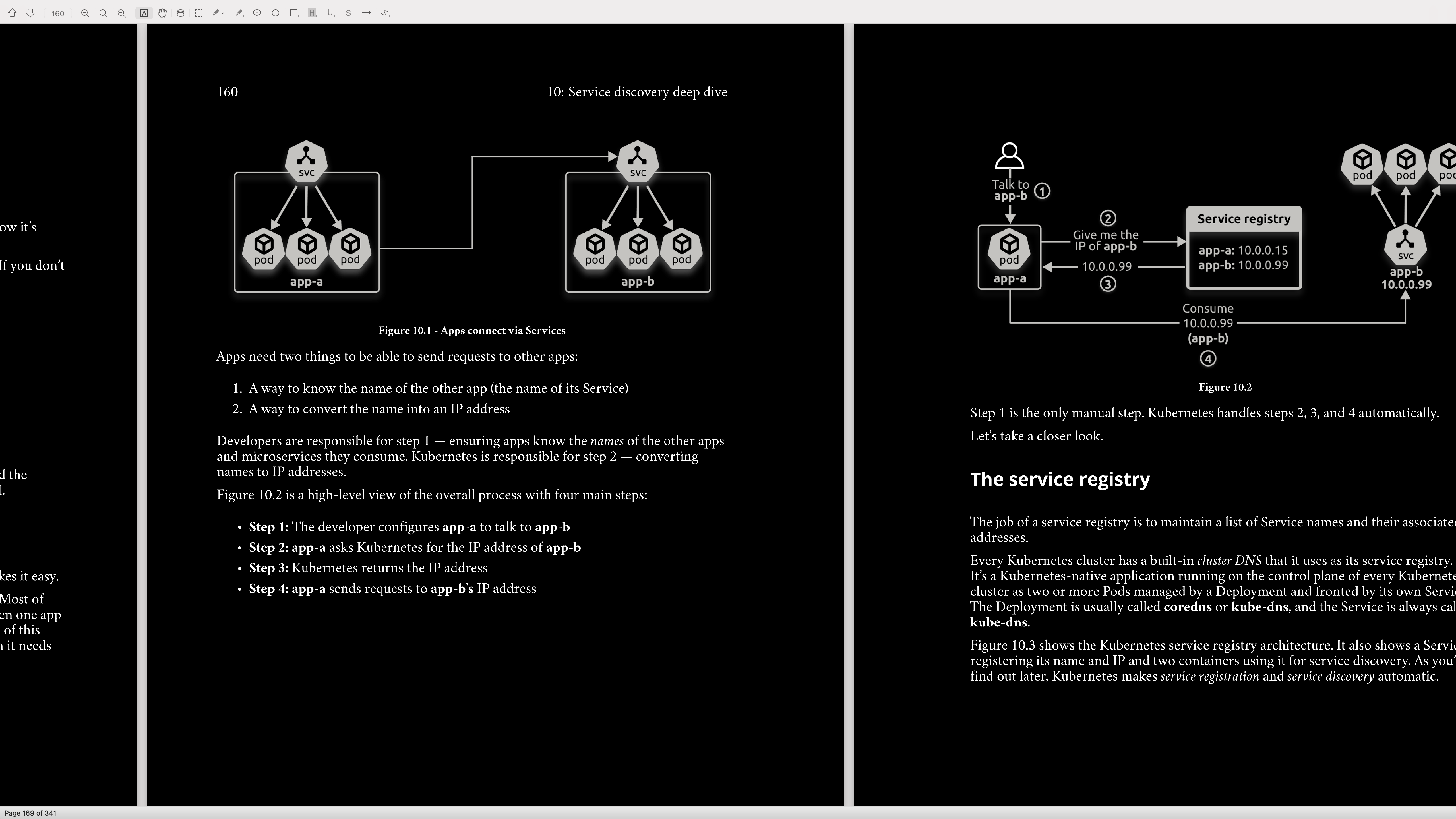
And the best of all is that this Horizontal Continuous reading mode can be used in full screen (image below).

Skim using Horizontal Continuous layout in full screen mode

About Stirling PDF

Stirling helps you read and edit PDFs privately. For “home users”, or people who need to edit PDFs only every few weeks, it offers Free tier, with self-hosted web-app. It also offers binary bundles in the form of desktop application for all platforms (macOS, Linux and Windows), but those seem to be outdated and considered legacy in terms of features. It seems that development team is giving highest priority to the web-app at the moment.

I chose to start with “Server Deployments” option but on macOS, using Docker.
I simply followed “Docker Guide” and I was up and running in few minutes.
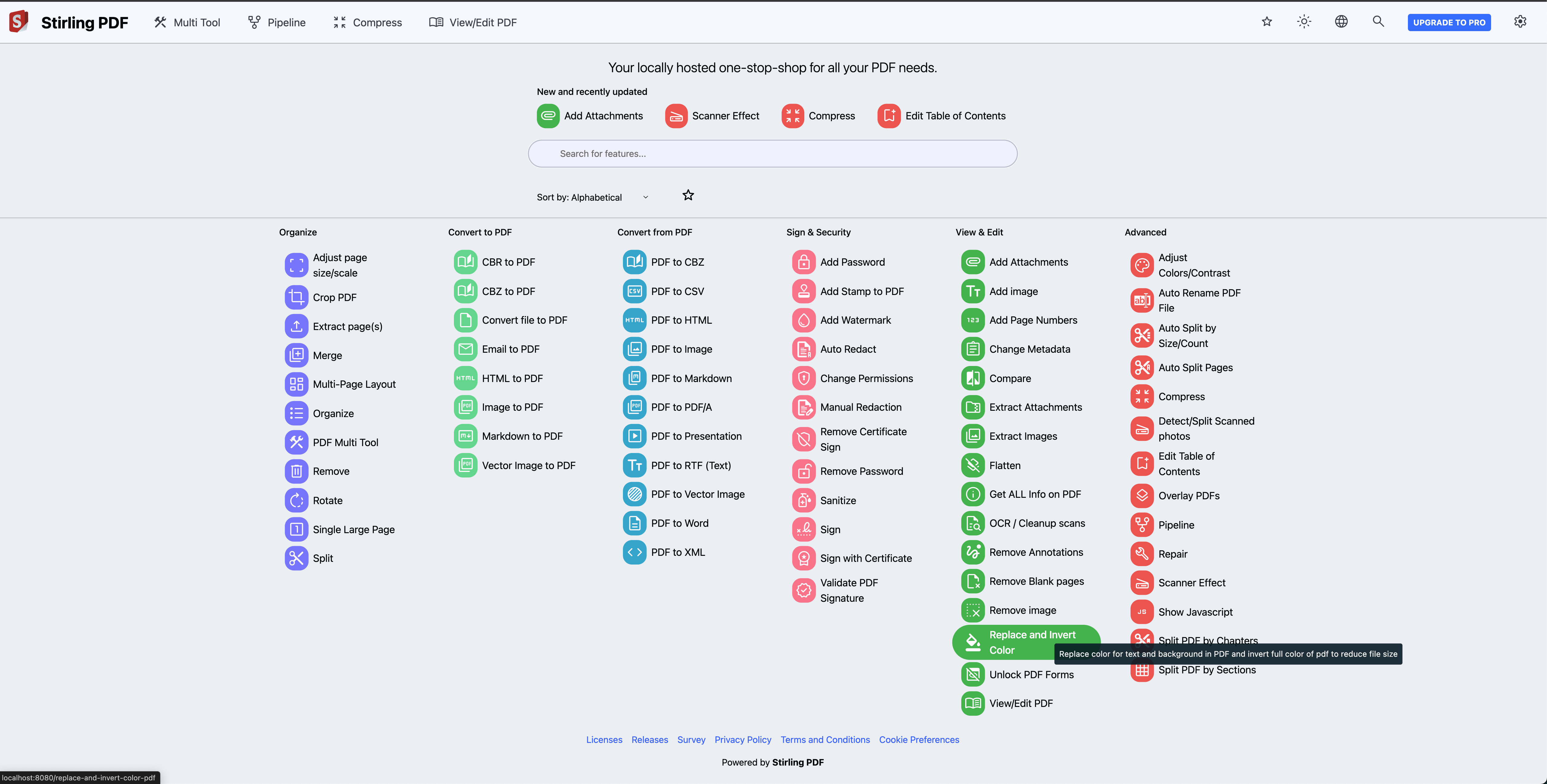
Here is a snapshot of the main page UI.

Starting page of Stirling PDF

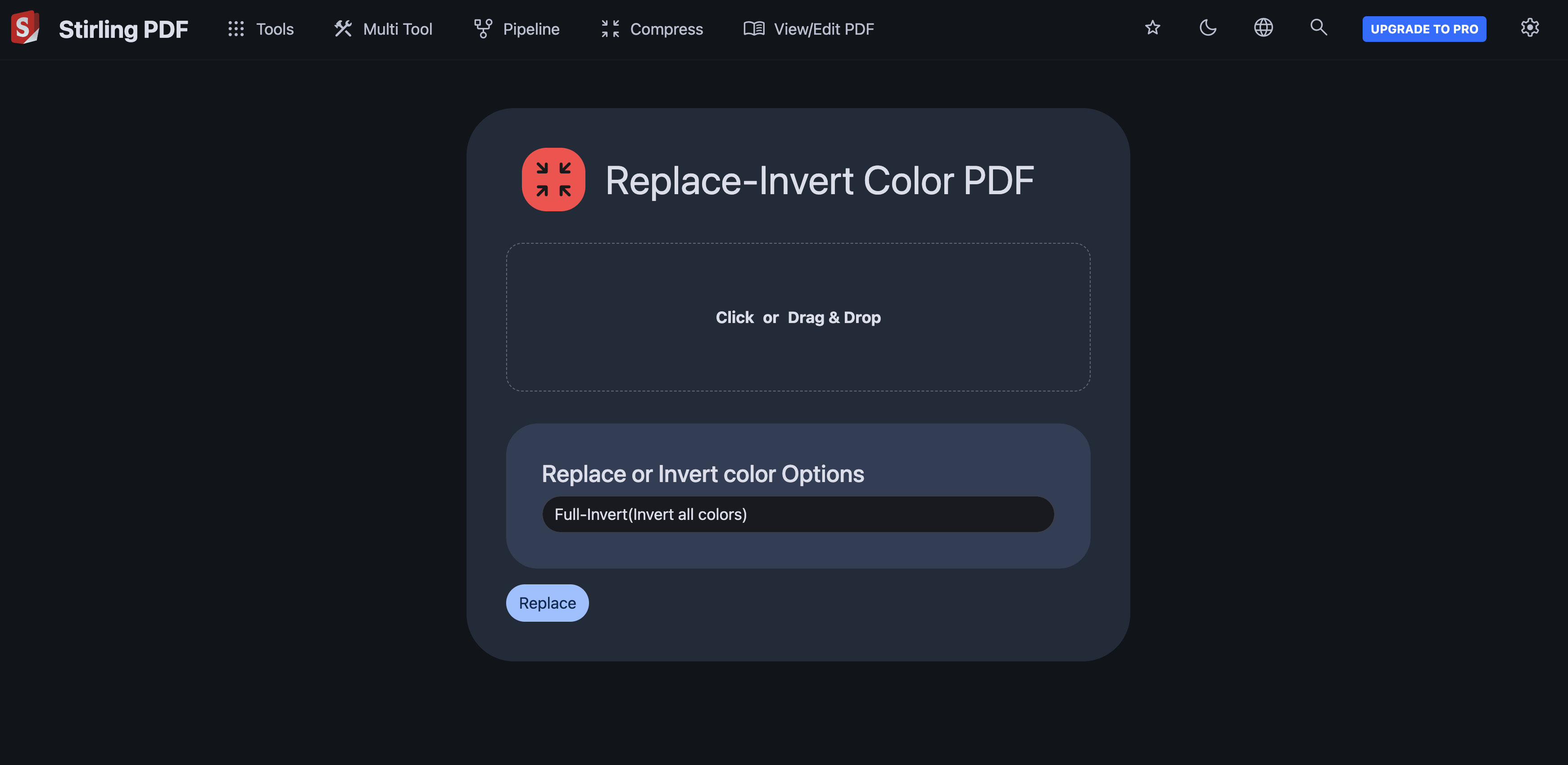
Of course, the first tool that I tried to invert the color of few books was “Replace-Invert Color PDF”, and I couldn’t be happier.

Replace-Invert Color PDF tool in Stirling PDF

The size of those inverted PDFs isn’t small to be honest, but given that I read at most 2-3 books at any point in time, all of my devices can handle it.

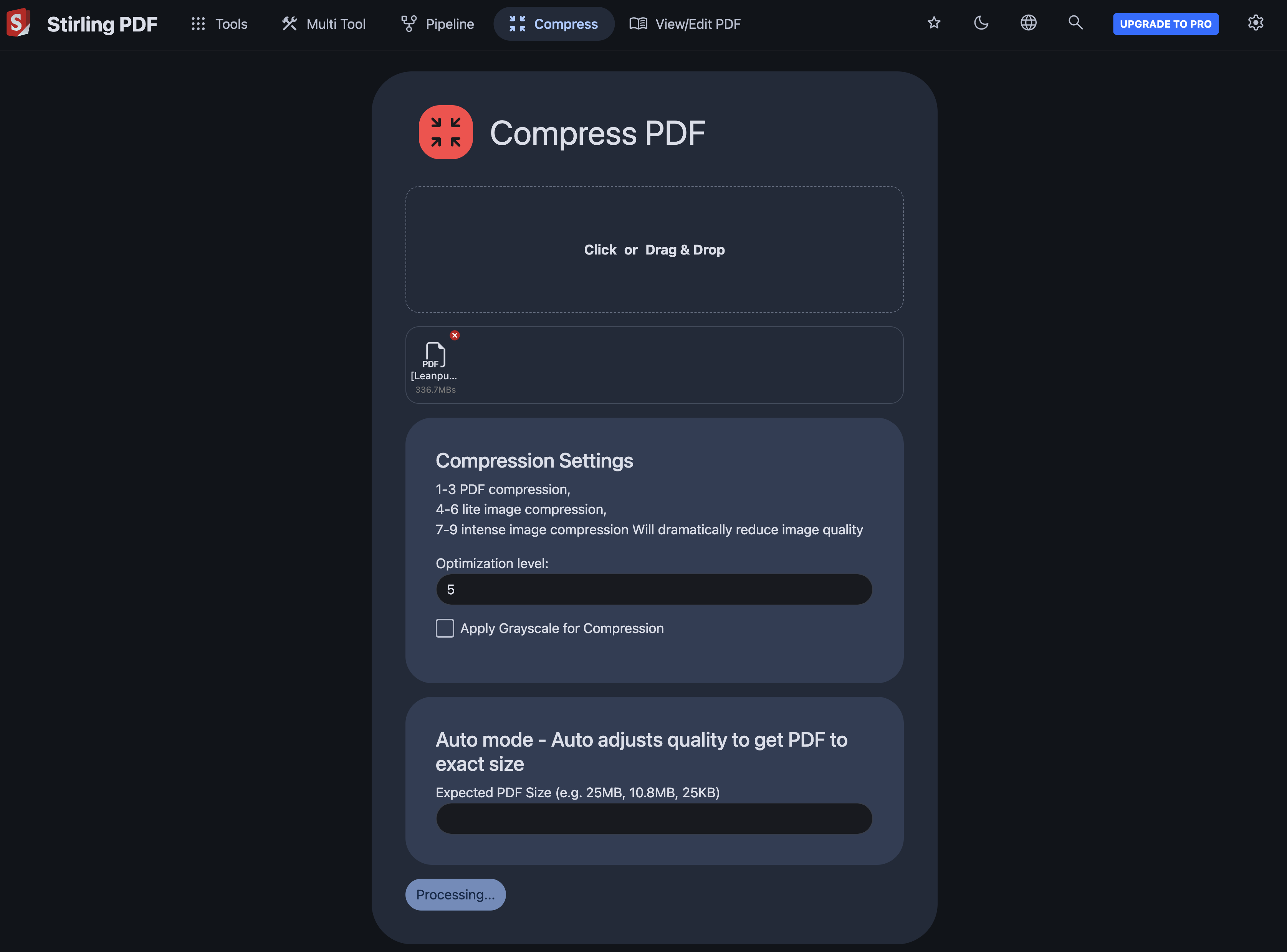
However, even for the problem of size of PDFs, Stirling-PDF offers another great little tool in it’s toolbelt - “Compress PDF”.

Compress PDF tool in Stirling PDF

All in all, I think I have found a good alternative to Adobe Acrobat PRO that offers plethora of tools with safety and privacy not being neglected.

Until next time!